
Dzees Home
yuanxi creation techTools
4.7382.00 Reviews
- Version
- 2.0.10
- Installs
- 100.00K
- Age Rating
- Everyone
Screenshots
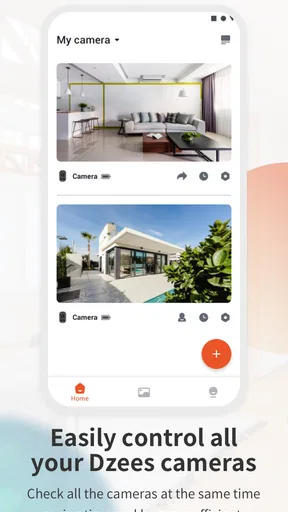
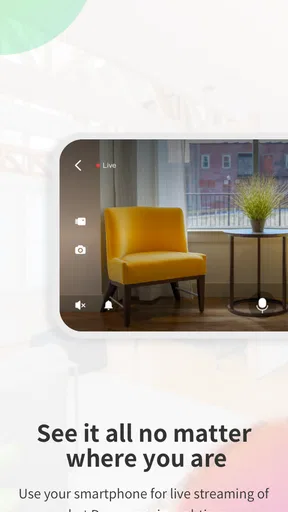
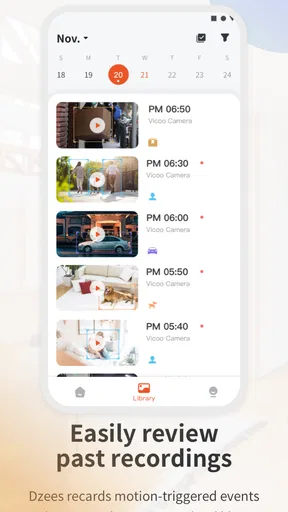
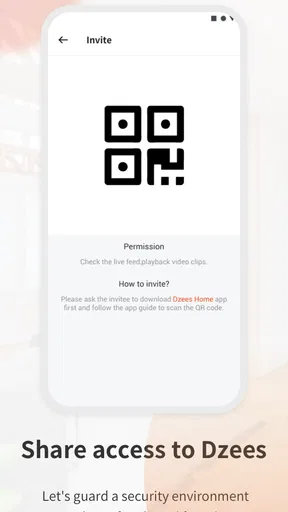
Our Review of Dzees Home
 Analysis by Appyee
I spent time using Dzees Home as a practical camera companion rather than treating it like a simple remote control. It belongs to the Tools category and is built by yuanxi creation tech for managing compatible smart-camera equipment through a phone. The basic appeal is easy to understand: instead of checking a separate monitor or relying on a computer, I can keep camera-related access close at hand while moving around the house.
That convenience matters most when the camera is part of a routine rather than an occasional gadget. I can imagine using it to check an entryway before opening the door, look in on a room while away, or quickly confirm what is happening without sitting at a desk. The experience is not identical to using a general-purpose camera app, because the value here depends on the Dzees Home ecosystem and the equipment it is meant to control.
How Dzees Home feels in its current state
The current release is version 2.0.10, and that number gives the app a more established feel than an early experiment. My overall impression is that it is aimed at people who want a focused smart-camera tool, not a crowded home-automation dashboard filled with unrelated devices. That narrower purpose can be a strength: when I open it, the reason for being there is clear.
Its store presence also suggests that it has found a real audience. The app holds a 4.7 average from around 3.3 thousand ratings, with more than 100 thousand installs and roughly 382 written reviews. Those figures do not guarantee that every phone or camera combination will behave perfectly, but they do make it easier for me to view the app as an actively used product rather than an obscure companion with no visible user base.
It is free to install and is suitable for Everyone, which removes two common barriers for households. A family member does not need to buy the app before trying it, and the age classification does not make it feel aimed only at technical users. There are in-app purchases ranging from $1.99 to $158.99 per item, so I would still examine any purchase screen carefully before accepting an optional upgrade or service.
The minimum operating-system requirement is Android 7.0. That is useful for owners of older Android phones, although compatibility is not the same thing as a guaranteed smooth experience. Camera viewing can be demanding on a device with limited memory, an unstable wireless connection, or an older processor. In practice, I would judge the app together with the phone and camera rather than by the operating-system requirement alone.
The everyday workflow that makes the app worthwhile
A realistic use case is a short check during a busy day. Suppose I am preparing dinner and hear movement near the front door. With the camera already arranged, I can use the phone to check the relevant view instead of leaving the kitchen and walking to another room. The benefit is not dramatic technology; it is the removal of a small interruption.
Another useful routine is checking a room before going to bed. I would open the app, look at the camera view, and confirm that the space appears normal. If the camera is positioned to watch a pet area, a storage room, or an entrance, that quick glance can be more convenient than opening a browser or switching between several unrelated services.
One detail I find important is the difference between occasional viewing and depending on the app for constant supervision. For occasional checks, a phone-based tool is comfortable. For continuous monitoring, a dedicated display may be easier on the battery, the eyes, and the person responsible for watching. I would not confuse Dzees Home with a replacement for every type of surveillance setup.
What the latest version means for established users
Version 2.0.10 is the clearest current marker of the product’s evolution, but a version number alone does not tell me which individual functions changed. I therefore treat it as evidence that the app has progressed beyond its first release, not as proof of a particular new feature. The app was released on May 18, 2021, so existing users are looking at a product with several years of history rather than a newly launched tool.
For someone already using an earlier build, the sensible approach is to update with a little preparation. I would make sure I know the account or device details needed to reconnect, check that the phone has enough free space, and avoid beginning the update immediately before an important trip. This is not because an update must cause trouble, but because camera apps are tied to hardware and network conditions in ways ordinary note or calculator apps are not.
I would also test the complete path after updating: open the app, confirm that the expected camera is visible, wait for the live view to load, and try the controls I actually use. A successful installation is not the same as a successful camera session. This simple check can reveal whether the problem is in the app, the camera’s connection, or the home network before I need the camera urgently.
For new users, the current release is a reasonable starting point because it avoids beginning with an obviously outdated build. Still, I would not promise that installing it alone solves setup. Smart-camera applications normally make sense only when the compatible hardware, phone, and network are working together. The app is the control layer; it cannot compensate for a camera that is offline or placed where its wireless signal is unreliable.
Where it is stronger than usual alternatives
The most obvious alternative is using a browser or a manufacturer’s broader smart-home application. A browser can be flexible, especially on a computer, but it often feels less immediate for a quick phone check. Dzees Home has a more direct identity as a camera tool, which is valuable when I do not want to navigate through unrelated home controls.
A general smart-home platform may be better for someone who wants lights, locks, thermostats, sensors, and cameras in one place. Its advantage is consolidation. The trade-off is that the camera experience can become one small part of a much larger interface. I would choose Dzees Home when the camera is the priority and choose a broader platform when combining many brands or device types is more important than a focused workflow.
A dedicated monitor remains a different kind of alternative. It can be better for a caregiver or household member who needs a screen visible for long periods, because a phone is easy to carry away, lock, or drain. Dzees Home is better when I need mobility and occasional access. The right choice depends on whether the camera is something I glance at or something I watch continuously.
There is also the option of a camera app supplied by another ecosystem. In that comparison, the deciding factor is not simply which interface looks nicer. I would first ask whether the camera I own is supported, whether the people who need access use compatible phones, and whether the app fits the household’s normal habits. A polished alternative is irrelevant if it cannot work with the equipment already installed.
Small habits that improve the experience
My first practical tip is to create a repeatable check routine instead of opening the app randomly. For example, I would check the camera when leaving home, after arriving, and before sleeping. A consistent routine makes the tool useful without turning every notification or sound into a reason to stare at the screen.
My second tip is to test the camera from the places where I will actually use the app. A view that loads perfectly beside the router may behave differently from a view requested upstairs or outside the strongest wireless area. Testing from the sofa, the front door, or the workplace gives a more honest picture of the setup than testing only during installation.
A third insight is to separate camera placement problems from app problems. If the image is poorly framed, glare is present, or an important doorway is partly hidden, reinstalling the application will not fix the result. I would adjust the physical position and then use the app to confirm the improvement. This sounds obvious, but it prevents a lot of wasted troubleshooting.
I would also avoid treating a phone as a permanent camera station unless that is genuinely convenient. Keeping the app open for long periods can make the phone less useful for calls, navigation, and other tasks. For a household that needs a dedicated always-on view, a separate monitor or another suitable arrangement may be a better investment than forcing a mobile app into that role.
Where the experience still has limits
The biggest limitation is that Dzees Home is not a universal camera manager. Its usefulness is tied to compatible Dzees equipment and the way that equipment connects. Someone who owns cameras from several unrelated brands may prefer a platform designed around multi-brand management, even if that means accepting a busier interface.
The phone itself is another point of friction. A small screen is convenient for a quick glance but less comfortable for examining details over time. I would not choose this as my main method for reviewing a long sequence of activity, comparing several views at once, or supervising a space for hours. Those jobs call for a larger display or a dedicated monitoring setup.
Network quality can shape the experience just as much as the application. A camera app may appear unreliable when the real issue is weak wireless coverage, congestion, or a camera that has lost power. Before deciding that Dzees Home is at fault, I would compare results near the camera, near the router, and on another trusted connection. That basic isolation step is especially useful when the app works sometimes but not consistently.
The purchase range also deserves attention. The app is free to start, but optional items can reach a substantial amount, so I would read each purchase description and confirm whether it is relevant to my setup. I would not assume that installing the free app automatically includes every service a camera owner might expect. A careful look at the purchase screen is part of using the product responsibly.
Privacy and household access should be handled deliberately as well. I would avoid sharing one login casually with everyone, and I would think about who genuinely needs access to the camera. A camera view can reveal more than people expect, even when the app itself is simple. The practical lesson is to treat phone access as part of home security, not as an ordinary entertainment login.
Who should use it and who should skip it
Dzees Home is a good fit for an owner of compatible Dzees smart-camera hardware who wants a straightforward mobile way to check it. It also suits people who value quick access more than advanced organization. If my main need were checking an entrance, looking at a pet area, or confirming that a room is fine while away, I would find the focused approach appealing.
It is less suitable for someone starting with a mixed collection of camera brands. That person should investigate a broader platform before committing to a single-device ecosystem. I would also steer away from it as the only solution for professional monitoring, intensive evidence review, or a household that needs a continuously visible screen.
Families should decide in advance who will use the camera and for what purpose. One person may want quick checks, while another may expect recordings, multiple viewpoints, or long-term supervision. Dzees Home can be useful in the first situation, but expectations should match the role of a phone companion rather than assume it is a complete security-control center.
What I would watch going forward
For future updates, I would pay attention to improvements that make existing camera owners’ routines more dependable: smoother reconnection after a network interruption, clearer handling of device status, and an easier path for households managing more than one compatible camera. These are the areas that determine whether a camera tool remains useful after the novelty fades.
I would also watch how the app balances its free entry point with in-app purchases. A free download is helpful, but the long-term value depends on whether the functions I actually need remain understandable and fairly presented. I prefer an app that makes the boundary between basic access and optional extras clear before I spend anything.
The product’s history gives me a cautiously positive impression. It has been available since May 18, 2021, and the current 2.0.10 release shows an ongoing product rather than a one-off companion. At the same time, I would judge each update by practical results on my own phone and camera, not by the version number alone.
My final recommendation is conditional but clear: if you already use compatible Dzees camera equipment, Dzees Home is worth trying as the everyday mobile control point. Its strongest quality is convenience, especially for short checks woven into normal household routines. It is not the best answer for mixed-brand management, constant monitoring, or demanding video review, but within its intended role it offers a focused and accessible way to keep a smart camera close at hand.
Verdict
Strengths of Dzees Home
- Clear live video helps monitor pets, rooms, or entrances remotely.
- Motion alerts can notify you quickly when activity is detected.
- Two-way audio makes it easy to speak through compatible cameras.
- Cloud and local recording options can help preserve important footage.
- Remote controls support convenient checks while you are away.
Limitations of Dzees Home
- Some advanced features may require a paid cloud subscription.
- Performance depends heavily on a stable Wi-Fi connection.
- Camera compatibility may vary between Dzees device models.
- Frequent alerts can become distracting in busy areas.
- Privacy concerns remain when cameras are placed inside the home.
Similar Picks in This Category
View All
Google LLC4.0

Gboard - the Google Keyboard
Google LLC4.5

Google Play services
Google LLC4.3

Google Play Store
Google LLC4.9

Files by Google
Google LLC4.5

SHAREit: Transfer, Share Files
Smart Media4U Technology Pte.Ltd.4.3
Frequently Asked Questions
What is Dzees Home, and what can I use it for?
Dzees Home is a companion app for managing compatible Dzees smart security cameras and related home-monitoring devices. After pairing a supported device, you can generally view live video, review recordings, receive motion alerts, communicate through two-way audio, and adjust camera settings from your phone. The exact tools available depend on your camera model, firmware, subscription options, and region.
How do I connect a Dzees camera to the Dzees Home app?
To connect a camera, install Dzees Home, create or sign in to an account, and follow the in-app setup instructions. Most devices require a stable Wi-Fi connection and may need to be placed close to the router during pairing. Check whether your model supports the required network band, because some cameras work only with 2.4 GHz Wi-Fi. Granting camera, microphone, notification, and local-network permissions may also be necessary.
Does Dzees Home require a subscription or additional payment?
The app can usually be downloaded without an upfront charge, but some advanced services may involve extra costs. Depending on the device and plan available in your area, cloud video storage, longer recording history, enhanced notifications, or other premium features may require a subscription. Many cameras can still provide basic live viewing and local storage functionality, but you should confirm the specific model’s storage options and current pricing before purchasing.
Can I use Dzees Home to watch my camera remotely and receive alerts?
Yes, remote viewing and motion-related notifications are among the app’s primary functions, provided the camera and phone have reliable internet access. You can typically open the live feed from outside your home, receive alerts when activity is detected, and use two-way audio on supported models. Notification timing can vary because of Wi-Fi quality, server conditions, phone battery restrictions, detection sensitivity, and privacy settings.
Is Dzees Home safe and compatible with my phone?
Dzees Home is designed for Android and iOS devices, but compatibility can vary according to the operating-system version, camera model, and app release. Because the app handles home video and account information, use a strong unique password, enable available security protections, keep the app and camera firmware updated, and review sharing permissions carefully. Avoid placing cameras in private areas and check the manufacturer’s privacy policy before enabling cloud services.
